Applies to QuarkXPress Server (All Versions)
Summary -
Extended licenses are for users who want to temporarily work on a computer that is not connected to the network (For Example on a laptop).
Configure settings for extended licenses in Quark License Administrator Control panel.
To define the settings for extended licenses:
- Open QuarkXPress Server Admin Client.
- Choose Administration > Check Out License
- Enter the maximum number of days users can check out the extended license.
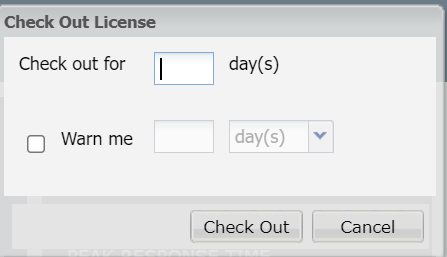
- In the Check Out License dialog box, enter the number of days the user is checking out the license.
- Check Warn me and enter the number of days before expiration for the system to send an email notification to the user that the license is about to expire. You can specify this length of time in days, hours, or minutes.
- Click check out. This option designates the license as an extended pool license.
Priyanka Bhotika
Comments