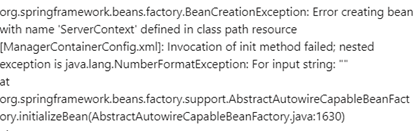
Background: At times, there is a scenario that the Quark Publishing Platform Server fails to start and throws an error message (ref. below screenshot)
Applies to: Quark Publishing Platform Server 15. x and 14.x
Solution: Following are the required steps to resolve the issue:
1. Open the ManagerConfig.xml file located in the Server/Conf folder.
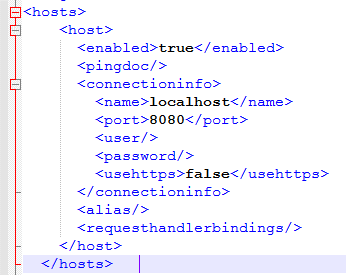
2. Add the QXPS Server name/ IP address & port number details in the following section. (ref. below screenshot)
Once you have added information similar to the one mentioned in the above screenshot.
Save the file and try to Start QPP Server.
Priyanka Bhotika
Comments