How to change the QuarkXPress Server Document Pool?
Solution:The documentpool contains the projects that are available for rendering. By default, the documentpool is a collection of discrete files or folders in a specific, identified folder located on the local server or on a connected network drive.
Default location of the document pool: C:\QuarkXPress Server Documents
Option 1
In order to change the document pool, please follow the below steps:
1. Go to QuarkXPress Server URL: localhost8080
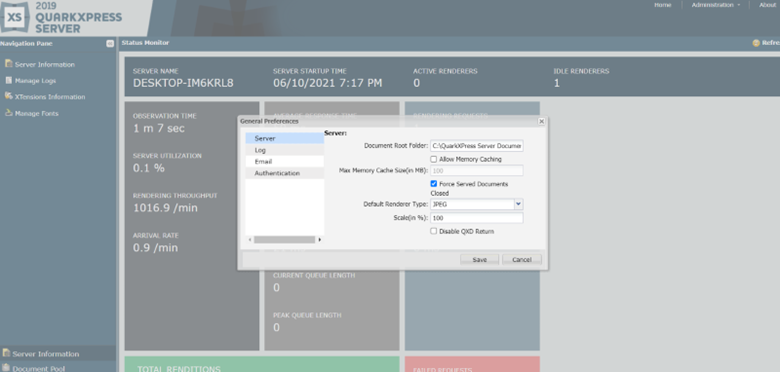
2.Click Administration>>Preferences>>General.
3. In Document root folder, enter the location of a new document pool.
3. Click Save
Option 2
1. Go to the QuarkXPress server installed directory, please follow the below path, and open the conf folder:
E.g: C:\Program Files\Quark\QuarkXPress Server 2019\
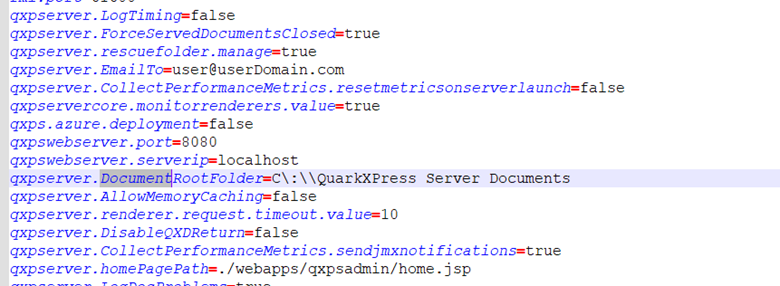
2. Open Serverapp.properties
3. Search for ”qxpserver.DocumentRootFolder” and enter the new document pool
Priyanka Bhotika
Comments